Rule Analyzer
Overview
The Rule Analyzer in ColorTokens Xshield provides a centralized view of all rules across templates assigned to the assets in your Xshield tenant. It helps administrators monitor rule usage, identify unused rules, and safely remove stale policies.
By offering visibility into rule hits and last used times, it ensures policies remain optimized, secure and aligned with Zero Trust principles.
Rule hits refers to the number of times a specific security rule has been matched by network traffic. In other words, whenever a traffic flow aligns with the conditions defined in a rule (like source, destination, port, or protocol), that event is counted as a rule hit. Example: If a rule is set to allow traffic from IP 192.168.10.10 to IP 192.168.10.20 on port 443 and this traffic occurs 5 times, then the rule will register 5 hits.
Value
ColorTokens Xshield uses a whitelisting policy approach, enforcing explicit allow policies so that only traffic matching the defined rules is permitted. As application architectures change or services are retired over time, some of these allow rules may no longer align with any active traffic flows.
Role of Rule Analyzer
The Rule Analyzer presents historical rule usage data. Based on this data, administrators can evaluate whether certain rules have remained unused and decide whether they should be removed
- Simplifies Rule Management
- Brings together all rules from templates that are applied to assets into a single consolidated view. (Rules from unapplied templates are not included in the analysis)
- Saves time spent navigating through templates individually.
- Improves Hygiene
- Helps identify unused or stale rules (based on “last used” time), preventing policy bloat.
- Ensures only relevant, actively used rules remain in the environment.
- Enhances Security
- Removing unused rules reduces the attack surface by eliminating legacy access paths.
- Prevents “shadow rules” from unintentionally allowing traffic.
- Ensures rules evolve in step with application and infrastructure changes.
- Improves Audit and Compliance
- Provides clear visibility into rule usage history (hits + last used time).
- Makes it easier to prove that policies are actively monitored and maintained.
- Operational Efficiency
- Filtering by attributes (e.g., App=CRM) allows teams to quickly analyze rule relevance for specific environments.
- With automatic tracking of hits and last-used timestamps, admins can make informed decisions without guesswork.
- Bulk selection and deletion of unused rules accelerates cleanup.
Key capabilities
- Centralized Rule Visibility: Aggregates and displays all rules across the assets in your Xshield tenant in one consolidated location. (Port and path rules)
- Rule Usage Metrics: for the rules which are deployed to assets in either test or enforce, rule analyzer shows how often a rule is used (hits) and the last time the rule was used (last used time)
- Unused Rules Detection: Identify rules not used within a period.
- Lifecycle Management: Review, filter, and delete unused rules to maintain policy hygiene.
- Contextual Filtering: Locate rules by asset attributes (e.g., App=CRM)
The Rule Analyzer does not automatically remove or modify any rules. Its purpose is to assist operators in identifying unused or stale rules by providing insights such as usage history, last used timestamp and rule hit count. All actions—including reviewing, disabling, or deleting rules—are left entirely to the operator’s discretion, ensuring full control and preventing unintended changes to policy configurations.
How to use Rule Analyzer
Access Rule Analyzer
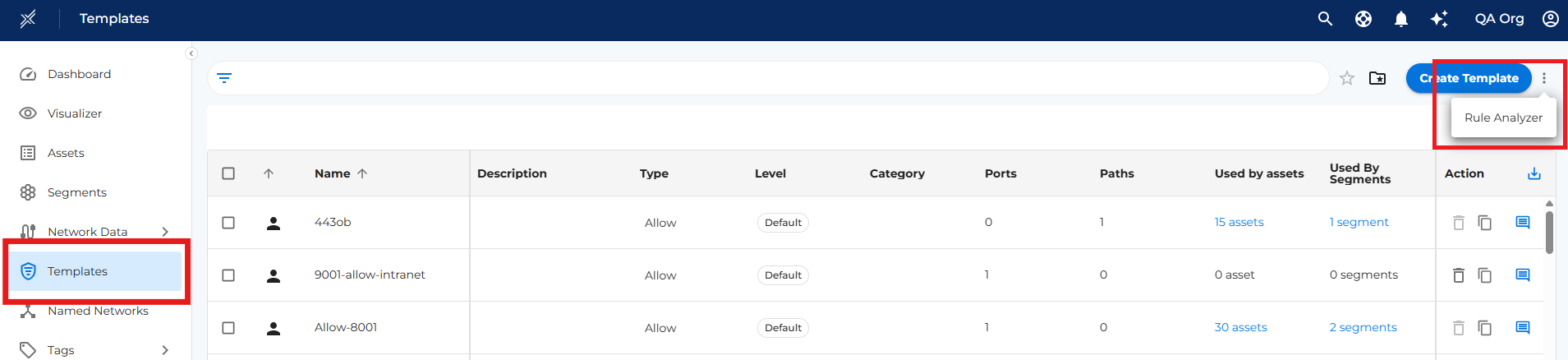
- In the Xshield UI, navigate to Templates.
- Select the three-dots menu (⋮) next to Create Template.
- Open Rule Analyzer.
Analyze all rules
- Review all rules across every template and asset in your Xshield tenant in a single consolidated view. Rule Analyzer only displays rules from templates that are assigned to assets. If a template is not assigned to any asset, it will not appear here and can be managed directly from the Templates page.
- Monitor rule usage by tracking hits and last used time to identify inactive or redundant policies.
- Apply asset filters to further narrow down the rules displayed based on specific asset attributes.
- Review the Last Used column to determine if the rule is active.
Identify and Manage Unused Rules
- Select View unused rules only to filter out rules that have not been used (e.g., last 3 months).
- Review unused rules in the visualization — each rule is shown individually, even if it exists in multiple templates.
- When deleting, the rule will only be removed from the specific template it belongs to (not across all templates), ensuring you retain control and avoid accidental overlaps.
- Streamline your policies by safely removing redundant rules, reducing clutter and minimizing operational risk
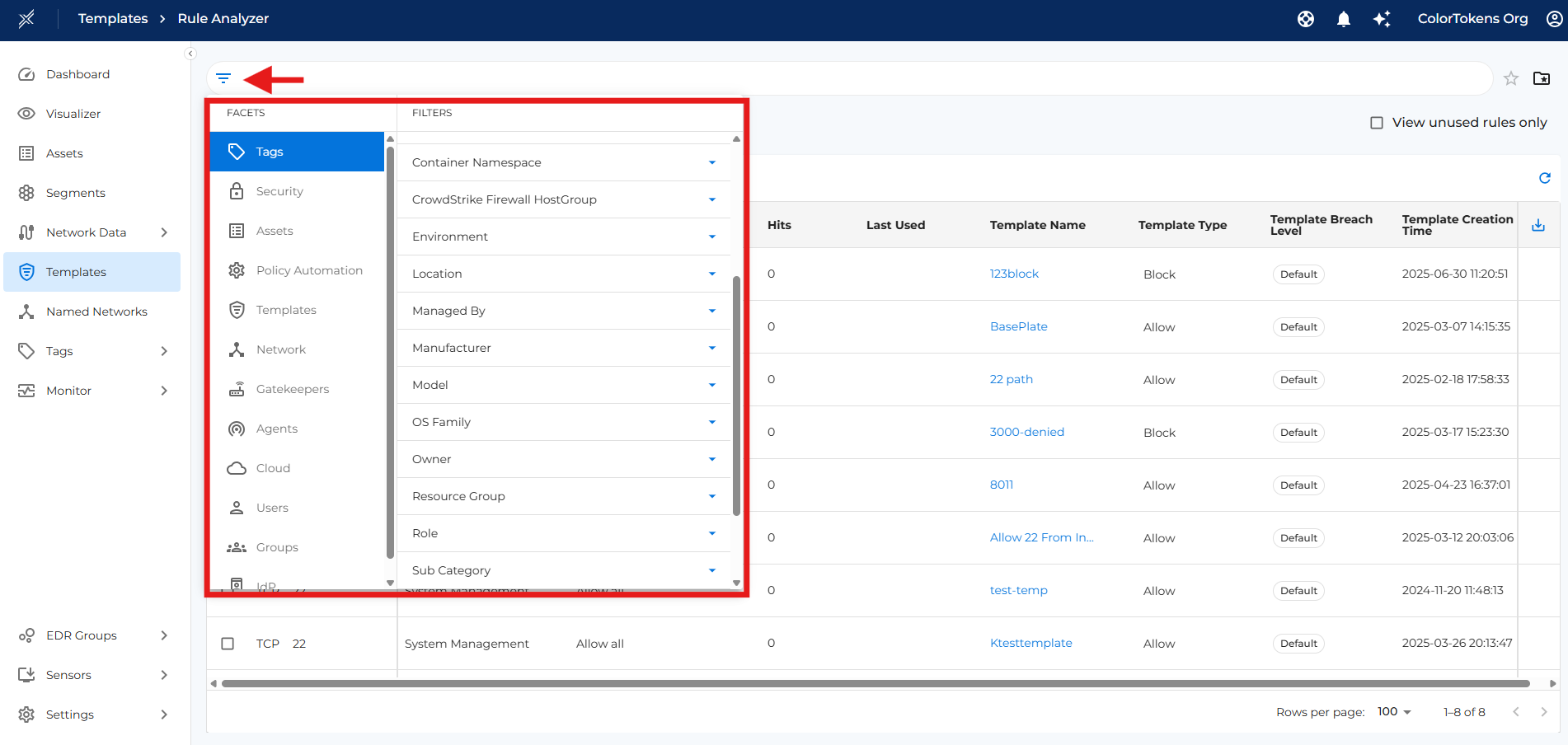
Apply Filters
- At any point, use the available filters (e.g., Application, Environment, Location, Business Value, etc.) to quickly narrow down and find rules associated with specific assets, templates, or contexts.
When to use Rule Analyzer
The operator will typically use Rule Analyzer in the following scenarios
- Application or Infrastructure Changes
- After retiring services or migrating applications, to clean up outdated rules.
- When restructuring network segments or updating Zero Trust policies.
- Security Hardening
- To minimize the attack surface by eliminating legacy or shadow rules.
- When ensuring that only actively used and relevant rules are in place.
- Audit & Compliance
- During internal or external audits to demonstrate rule usage history.
- To show that segmentation policies are actively monitored and maintained.
- Operational Efficiency
- When managing rules across multiple templates and assets.
- To filter and analyze rules by attributes like application, environment, or location. For bulk review and deletion of unused rules.
- Policy Hygiene & Optimization
- When you want to identify and remove unused or stale rules that haven't been used in a long time.
- To reduce policy bloat and maintain a lean, efficient rule set.
Summary
The Rule Analyzer is a lifecycle management tool for segmentation policies in Xshield.
It consolidates rules, tracks their usage, detects unused ones, and allows safe deletion.
By keeping policies lean and relevant, Rule Analyzer strengthens security, improves operational efficiency, and ensures compliance with Zero Trust principles.