CrowdStrike
Overview for Building Agentless Microsegmentation
Xshield platform provides two modes of integration with CrowdStrike:
- Spark Mode - Any new integrations, Xshield uses Spark to enforce firewall policies. This is the recommended mode for new integrations.
- CrowdStrike Mode - In this mode, Xshield uses CrowdStrike's APIs for both network telemetry and firewall enforcement through the CrowdStrike Firewall Management API
Integration Mode Selection
When activating the CrowdStrike integration for the first time, you will be prompted to choose between Spark and CrowdStrike modes. This is a permanent choice and cannot be changed later. Make sure to carefully consider your requirements before selecting the integration mode.
Implementation Guide
1. Spark Mode Implementation
Prerequisites
- Falcon Data Replicator(FDR) - For ingesting network flow records from CrowdStrike platform. Xshield requires a configured FDR information (that allows data to be exported) to be generated on the CrowdStrike platform.
2. CrowdStrike Mode Implementation
Prerequisites
- Falcon Data Replicator(FDR) - For ingesting network flow records from CrowdStrike platform
- Falcon Firewall Management - For pushing FireWall policies to the CrowdStrike Agents
Common Implementation Steps
1. Verify Subscriptions
Check the status of required subscriptions in Support and resources > General settings > CID details in the CrowdStrike console.
2. Generate Required Credentials
For Both Modes:
- API Credentials - Follow the procedure at Generating API Credentials on CrowdStrike UI
- FDR Credentials - Follow the procedure at Generating FDR Credentials on CrowdStrike UI
3. Configure FDR Feed
Set up a dedicated FDR feed with the following events:
| Event Name | Platforms | Comments |
|---|---|---|
| NetworkListenIP4 | Windows, macOS, Linux | To capture IPv4 listen events |
| NetworkConnectIP4 | Windows, macOS, Linux | To capture IPv4 connect events |
| NetworkReceiveAcceptIP4 | Windows, macOS, Linux | To capture IPv4 accept events |
| DnsRequest | Windows, macOS, Linux | To collect DNS requests |
You can check the status of the enabled subscriptions/modules by navigating to Support and resources > General settings > CID details in the CrowdStrike console.
The following Crowdstrike credentials are required for both Spark and CrowdStrike modes:
Required Credentials
- API Credentials - To make programmatic API calls to CrowdStrike platform
- FDR Credentials - To capture the network events from CrowdStrike platform
API Credentials
The procedure for generating API credentials on the CrowdStrike platform is available at Generating API Credentials on CrowdStrike UI
API credentials are used to make programmatic API calls to CrowdStrike platform. The following operations are performed using the API credentials:
- Fetch host groups and hosts information from CrowdStrike platform
- Creation of host groups and assign hosts to host groups
- Manage firewall policies, rule groups and rules
- Fetch firewall events from CrowdStrike platform
These credentials must have sufficient permissions. These permissions are termed as Scopes in CrowdStrike platform. Each Scope can be provided with Read only or Write permissions. The required scopes depend on your chosen integration mode:
Spark Mode Required Scopes
| Scope | Read/Write | Comments |
|---|---|---|
| Host groups | Read | To read information about the host group. |
| Hosts | Read | To read information about the hosts. |
CrowdStrike Mode Required Scopes
| Scope | Read/Write | Comments |
|---|---|---|
| Host groups | Read & Write | To read information about the host groups and to create required host groups for Firewall Enforcement. If we are only targeting visibility, write permission is not required. |
| Hosts | Read | To read information about the hosts. |
| Firewall Management | Read & Write | To create Firewall policies, Rule Groups, Rules, assign Host groups to policies etc. If we are only targeting visibility, this permission is not required. |
Refer to https://falcon.us-2.crowdstrike.com/documentation/page/a2a7fc0e/crowdstrike-oauth2-based-apis for details about how to generate API credentials.
FDR Credentials
The procedure for generating FDR credentials on the CrowdStrike platform is available at Generating FDR Credentials on CrowdStrike UI
FDR credentials also called CrowdStrike Data Replicator feed credentials are required to capture the network events from CrowdStrike platform.
A separate feed must be created for each Xshield-Crowdstrike integration. The FDR feed must have the following primary events enabled:
| Event Name | Platforms | Comments |
|---|---|---|
| NetworkListenIP4 | Windows, macOS, Linux | To capture IPv4 listen events |
| NetworkConnectIP4 | Windows, macOS, Linux | To capture IPv4 connect events |
| NetworkReceiveAcceptIP4 | Windows, macOS, Linux | To capture IPv4 accept events |
| DnsRequest | Windows, macOS, Linux | To capture DNS requests events. |
A total of 12 primary events must be enabled (4 types of events for each of Windows, macOS, and Linux platforms).
IMPORTANT NOTE: There can only be a maximum of 4 active FDR feeds on a given CrowdStrike tenant. Make sure the created FDR feed is active.
Refer to https://falcon.us-2.crowdstrike.com/documentation/page/fa572b1c/falcon-data-replicator for details about how to generate FDR credentials.
4. Activate Integration
Step-by-Step Activation
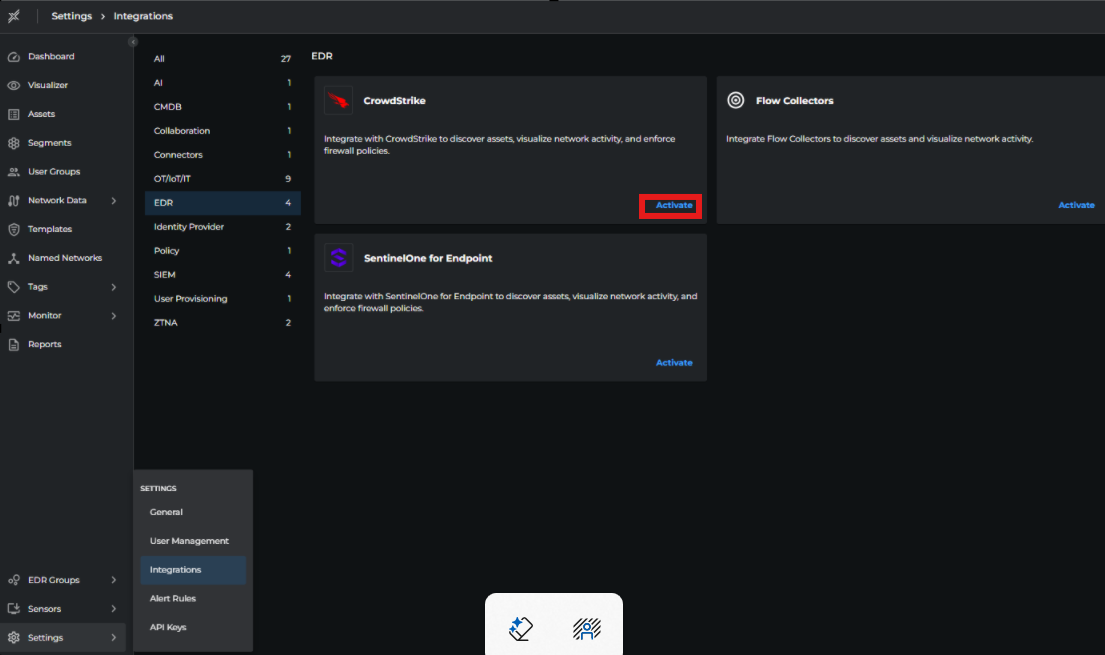
- Navigate to Settings > Integrations > EDR > CrowdStrike
- Click Activate
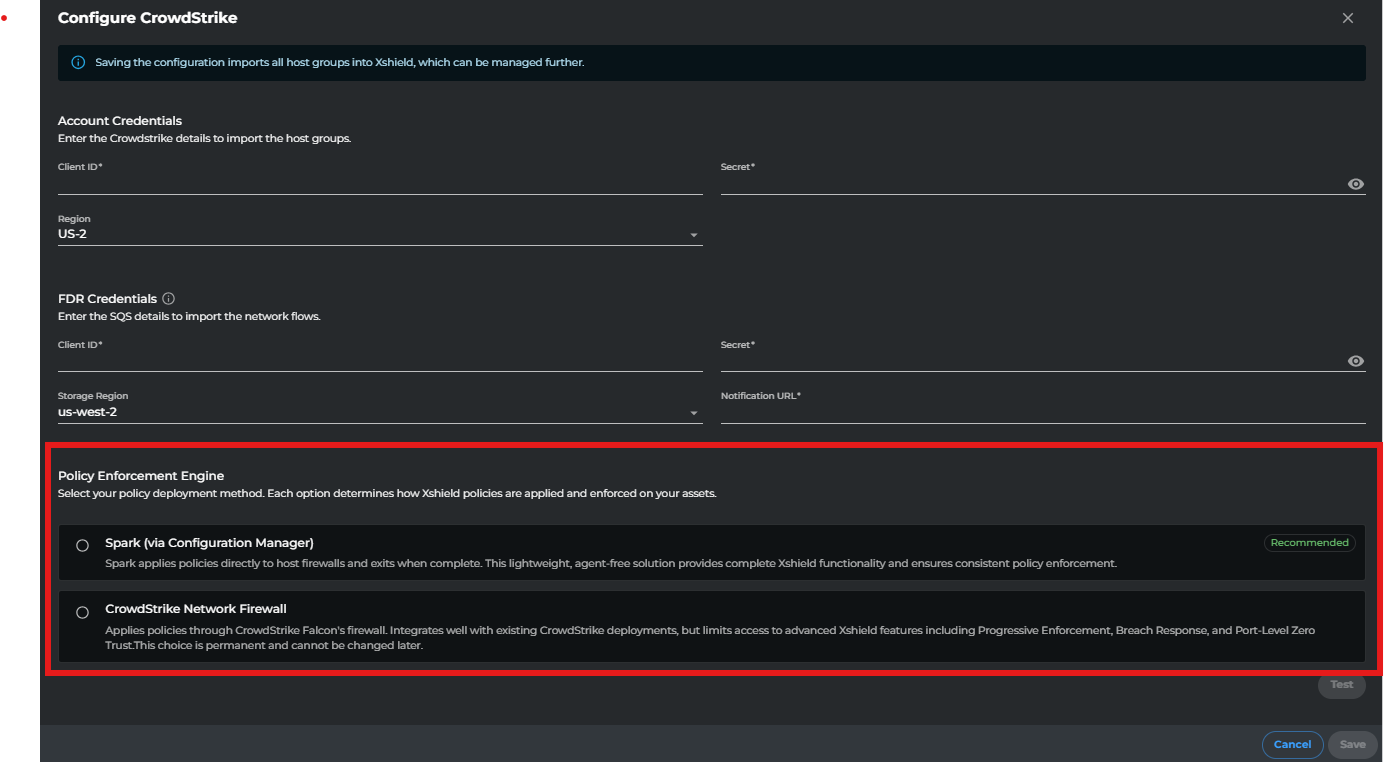
- Provide Required Credentials
- Select Policy Enforcement Engine:
- Spark Mode (Recommended)
- CrowdStrike Network Firewall
- Click Test to validate credentials
- Click Save to complete activation
Post-Activation
- Host groups will be automatically fetched (takes ~5 minutes)
- A new Host Groups menu item will appear in the left navigation
- Select host groups to view imported CrowdStrike assets
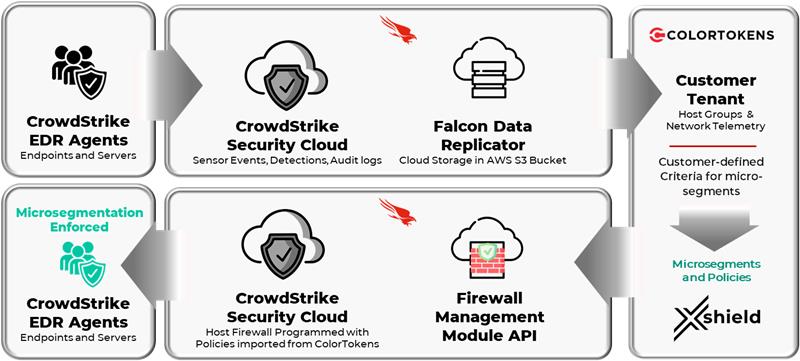
Once the integration is activated, Xshield platform will automatically fetch all the host groups present in the CrowdStrike platform. It can take up to 5 minutes for the host groups to be fetched. A new menu item Host Groups will appear in the left navigation bar. Clicking on this menu item will display the list of host groups fetched from the CrowdStrike platform.
Host Discovery
The CrowdStrike platform installs agents on endpoints to discover them. Operators can group discovered hosts into Host Groups based on tags such as Hostname, Grouping Tags, OS Version, Platform etc. These Host Groups and Hosts are first-class abstractions in the CrowdStrike platform.
Customers may have a large number of hosts managed by the CrowdStrike platform. They may decide to implement micro segmentation on all or only a certain set of those hosts using the Xshield solution. To facilitate this, the integration provides a facility to limit the hosts to be managed by the Xshield platform. Customers can activate a selected set of host groups and the Xshield platform will onboard/import hosts from these activated host groups.
Activate/Deactivate Host Groups
From Host Groups page in Xshield console, select one or more host groups and select Active/Inactive option under Change Status. This will open a fly panel. Review the selected host groups and click on Confirm button to activate/deactivate the selected host groups.
In case of activation, Xshield platform will start fetching hosts from the activated host groups. It can take up to 10 minutes for the hosts to be fetched and added to Xshield platform.
In case of deactivation, Xshield platform will remove the hosts from the deactivated host groups. It can take up to 10 minutes for the hosts to be removed from Xshield platform. If the hosts that are part of the deactivated host group are also part of another active host group, such hosts are not removed from Xshield platform.
Xshield platform will sync hosts from the active host groups at regular intervals (every 24 hours) or sync can be manually triggered. Xshield retrieves hardware, operating system telemetry data, and other tags for hosts (using the CrowdStrike API) within selected host groups. This data is populated as assets in Xshield and used to define segmentation groups.
View and Explore Assets
From Assets page in Xshield console, you can view and explore the hosts imported from CrowdStrike platform. Click on any asset name to view the details. The asset details page will display information like IP Address, Operating System, Tags, etc.
Network Visibility
CrowdStrike provides network events through a facility called Falcon Data Replicator (FDR). As soon as the integration is added, Xshield platform starts gathering the network events using FDR and starts ingesting these events to the Xshield platform. Only network events pertaining to imported hosts are ingested and remaining unwanted events are discarded.
These events are mapped to ports&paths in Xshield and are associated with appropriate assets. This data allows network communications visibility through the Xshield visualizer.
Considerations:
- CrowdStrike Falcon agent pushes the network events data almost immediately on collection to the CrowdStrike platform but will throttle if the CPU is busy. CrowdStrike platform buffers the events across all hosts and uploads them to the S3 bucket once every five(5) minutes. The Xshield platform reads data from the S3 bucket once every five(5) minutes. The Xshield Traffic Ingestion service will take another two(2) minutes to consume this data. This roughly takes under fifteen(15) minutes for data collected by the CrowdStrike agent to show up on the Xshield platform.
- CrowdStrike Falcon agents limits the number of similar network events they send to CrowdStrike platform. Agents only send one unique network event per one hour on Linux, and on Windows/macOS, they send one unique network event per every 24 hours. Unique event is defined as process ID, source IP, destination IP, destination port, and protocol for outbound connections and process ID, source IP, destination IP, destination port, and protocol for inbound connections.
- CrowdStrike Falcon agents captures only the network events Connect, Accept, and Receive. They do not capture packet events. Hence, it is not possible to derive the volume of data transmitted over these connections. Because of this, Data Bytes in the Paths is always specified as zero(0)
Segment and Template Definition
New segments (based on tags) can be created on the Xshield for assets imported from CrowdStrike. This follows the standard segment creation process in Xshield.
Click on Segments menu item in the left navigation bar. Select CrowdStrike tab and click on Create Segment button. Provide the segment name and description. Click on Save button to save the segment
Templates and named networks can be added to the segment during segment creation time or can be added later. To add templates and named networks after the segment is created, click on More Options button of the segment in the CrowdStrike segments page and select Manage Templates or Manage Named Networks. Add appropriate templates and named networks and click Assign button to save the changes.
Templates allow specifying FQDN for outbound rules. CrowdStrike agents resolves FQDN into IP addresses before programming the firewall rule. It also updates firewall rules when a new IP address is discovered for the FQDN.
CrowdStrike Mode Considerations:
BELOW ARE SOME OF THE CRITICAL ASPECTS THAT MUST BE FOLLOWED WHEN USING CROWDSTRIKE MODE:
- We do not support mixed mode of operation of firewall policies. This means, customer must not have any pre-existing firewall policies in CrowdStrike platform. All the firewall policies are created & managed by Xshield integration.
- As part of CrowdStrike segment creation, Xshield creates a custom core tag with name "CrowdStrike Firewall Host Group" in Xshield platform and the integration tags imported CrowdStrike assets with appropriate values for this tag.
- Make sure that there is a free slot for this custom core tag as the integration attempts to create this tag during CrowdStrike segment creation. As of now, Xshield platform allows up to 4 custom core tags.
- Make sure that this tag is not deleted manually by the customer as this is required for functioning of firewall implementation.
- For this tag, do not manually modify an asset's tag value or add new tag values.
CrowdStrike Platform Firewall Implementation (CrowdStrike Mode)
In CrowdStrike mode, the platform does not allow firewall programming of individual assets and it happens at Host Groups level.
Firewall Policy Structure
- Firewall policy contains one or more rule groups
- Each rule group contains one or more rules
- Firewall policies and rule groups are platform-specific
- Every platform requires separate Firewall policies
Host Group Assignment
- Multiple host groups can be assigned to a firewall policy
- Assets can belong to multiple host groups (via static assignment or dynamic tags)
Important Restriction A CrowdStrike asset can only receive firewall rules from one firewall policy. When an asset belongs to multiple host groups with different firewall policies, the policy with the highest precedence is selected and applied to that asset.
Xshield vs CrowdStrike Implementation
ColorTokens has different firewall policy implementation semantics:
- ColorTokens segmentation model is hierarchical with higher level segments, mid level segments and leaf segments
- These leaf segments are the true micro segmentation boundaries
- Common templates/named networks can be assigned at higher levels
- Policy automation configurations can be applied at segment or asset level
Refer to CrowdStrike Firewall Management documentation for more details.
Segment Enforcement
CrowdStrike Mode
Segmentation Model Requirements
Due to CrowdStrike's firewall enforcement implementation, the following requirements must be followed:
- CrowdStrike platform does not provide support for hierarchical microsegmentation
- All segments must be leaf segments
- Common templates and named networks must be assigned to each leaf segment individually
- Policy automation configurations can only be applied at segment level, not at asset level
Segment Precedence
To handle multiple segment matches, a precedence system is implemented:
- If an asset matches criteria of multiple segments, it is assigned to the segment with highest precedence
Host Group Integration
For each CrowdStrike segment:
- A pseudo asset named EDR_GROUP_
<segment>is created - This is necessary because policy enforcement in CrowdStrike occurs at HostGroup level
- A corresponding host group is created in CrowdStrike platform
- All segment members are automatically added to this host group
- Changes are synchronized every 30 minutes
Segment Behavior
- Assets automatically inherit zero trust settings, templates, and named networks from their segment
- These settings cannot be applied at asset level due to CrowdStrike restrictions
- Customers can use CrowdStrike segments to program automation settings, assign templates, and named networks like native Xshield segments
Policy Enforcement
When a segment is enforced:
- Following entries are created in CrowdStrike platform:
- Firewall Policies (one each for Windows and MacOS)
- Rule Groups (two per policy: inbound and outbound)
- Rules
- Integration continuously monitors for configuration changes
- Updates reflect in CrowdStrike platform within 15 minutes
Access Policy Implementation
- Create two different segments to use as source/destination in templates
- Assign templates to respective segments
- For membership changes:
- Wait up to 30 minutes for automatic update, or
- Use manual Sync operation for immediate effect
Spark Mode
Policy Implementation
Spark mode follows ColorTokens' native firewall policy implementation:
- Supports hierarchical segmentation model
- No segment precedence requirements
- Policies can be applied at both segment and asset levels
- Provides full flexibility in policy inheritance and overrides
Implementation Details
Spark program handles segment enforcement as follows:
- Spark connects securely to Xshield Platform
- Retrieves latest policy updates for the host
- Translates policies into native firewall rules
- Reports programmed firewall rules back to Xshield platform
A configuration management server initiates Spark on designated hosts to ensure consistent policy enforcement.
Firewall Events
CrowdStrike Mode
In CrowdStrike mode, firewall events are available for the firewall rules configured with allow with log and deny with log actions. These events are collected by the integration via API and ingested to Xshield platform. This process works similar to how native Xshield agents collect and publish firewall events to the platform.
The deny events show up under Monitor > Logs with Log Category as Policy and Log Name as Blocked communication attempt.
Limitations:
CrowdStrike platform does not provide firewall events when traffic matches a rule with a wildcard port and protocol:
- This prevents detection of network communications without a matching policy template (simulate mode restriction)
- Traffic dropped by the default deny policy is not reported by the Falcon platform, limiting Xshield's ability to display discarded network communications
Spark Mode
Spark collects firewall event logs from native system logs.
These logs are then published back to the Xshield platform for visibility and analytics.
Limitations
The following limitations apply only to CrowdStrike mode (not applicable to Spark mode). These limitations exist due to restrictions or limited capabilities on both the CrowdStrike platform and the Xshield security platform.
CrowdStrike Platform Limitations
The following features are unsupported due to restricted functionality on the Xshield Security Platform:
- Breach Response Templates for CrowdStrike Segments
- Process based Policy Templates
- No support for Progressive Active/Open Ports
The following features are unsupported due to limitations in functionality on the CrowdStrike Platform:
Hierarchical microsegmentation FQDN based Policy Templates (No association of FQDN to Paths in Network Telemetry)
Spark Mode Advantages
Spark mode does not have the above limitations and provides:
- Linux support for firewall programming
- Breach Response Templates support
- Process-based Policy Templates support
Segmentation
Refer to Segment and Template Definition section for details.
User Segmentation
User Segmentation policies cannot be applied on Crowdstrike installed assets.
User Segmentation works by identifying the user who has logged onto the desktop or laptop so that the policies that applies to group membership can be enforced on the desktop or laptop.
CrowdStrike platform does not provide a mechanism to notify this event and hence the Xshield platform cannot bind the user's policy to the asset where a CrowdStrike agent is installed.
Recommendation: Install the Xshield agent on Linux hosts for micro-segmentation policy enforcement.
Network Telemetry
Refer to the Network Visibility section for details.
Firewall Logs
Refer to the Firewall Events section for details.
Sync Timings
| Operation | Applicable Mode | Trigger | Time to Update |
|---|---|---|---|
| Import Host Groups | Both | Integration activation Manual sync Scheduled Sync(every 24 hours) | Up to 10 minutes |
| Import Hosts | Both | Host Group activation/deactivation Manual Sync Scheduled Sync(every 24 hours) | Up to 10 minutes |
| Import Firewall Logs | Both | Continuous | Up to 10 minutes |
| Import Network Telemetry | Both | Continuous | Up to 30 minutes |
| Export Firewall Host Group Members | CrowdStrike | CrowdStrike Segment membership changes Manual Sync Scheduled Sync(every 30 minutes) | Up to 10 minutes |
| Export Firewall Policy | CrowdStrike | Any Segment Policy update Manual Sync | Up to 10 minutes |